
Moodle KU is Kuwait University’s official e-learning platform, accessible at moodle.ku.edu.kw. Students and faculty log in using one of three methods: the KU SIS university account, a local user account, or a limited guest session. The platform handles course materials, assignment submissions, quizzes, grade tracking, and faculty-to-student communication across all Kuwait University colleges.
Get Into Your Moodle KU Account
- Go directly to moodle.ku.edu.kw — bookmark this URL now. Many students waste time landing on unofficial portals that look similar but do not connect to the Kuwait University system.
- Use KU SIS login if you have a university email — this is the recommended method for all enrolled students and faculty. Local User login is a secondary fallback, not the primary route.
- Download the KU Moodle app from the Google Play Store or Apple App Store to receive assignment due-date notifications and access course content offline — especially useful during exam periods.
What Is Moodle KU and Why Does Kuwait University Use It?
Moodle is an open-source e-learning system and platform that supports the entire learning process, from design and use to management and evaluation. It is currently the official e-learning platform at Kuwait University.
Kuwait University did not adopt Moodle by accident. The university chose Moodle for several reasons, including its high security level, ability to monitor students’ progress throughout the course, multiple communication tools between teachers and students, features for generating reports and studies at the end of the semester or academic year, and the ability to upload student assignments electronically in various formats.
What Moodle KU replaces
Before centralised e-learning, Kuwait University students received course materials in print, submitted assignments physically, and had no digital channel for grade inquiries. Moodle consolidates all of this into a single platform accessible from any device, at any time.
Who the platform serves
Moodle KU serves three distinct user groups: enrolled students who access course materials, submit assignments, and sit online quizzes; faculty members who upload content, grade submissions, and communicate with classes; and guest users who can preview limited publicly available course content without an account.
The Electronic Learning Center (ELC)
The Kuwait University Electronic Learning Center (ELC), accessible at elc.ku.edu.kw, is the administrative body responsible for the Moodle platform. The ELC publishes official student and faculty guides for Moodle use and provides technical support for login and system issues.
Method 1: How to Log in to Moodle KU via KU SIS
The KU SIS (Student Information System) login is the primary and recommended method for all enrolled Kuwait University students and faculty. It uses your Kuwait University institutional email credentials — the same credentials you use for other KU digital services.
Step 1 — Open the Moodle KU portal Navigate to moodle.ku.edu.kw in your browser. Use Chrome or Firefox for best compatibility. If the page does not load, check your internet connection or try on a different network — the platform occasionally undergoes maintenance during off-peak hours.
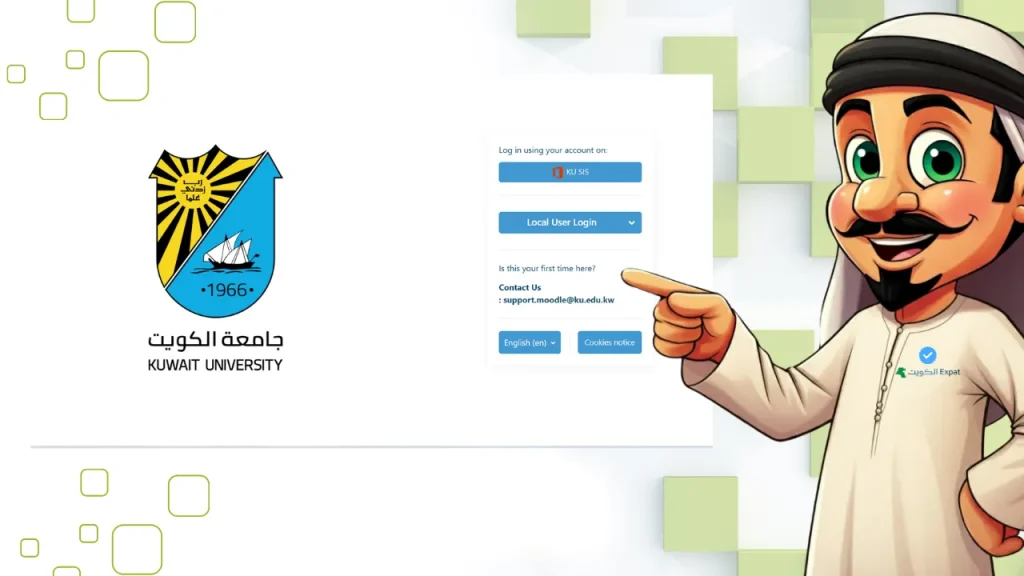
Step 2 — Click “KU SIS” on the login page On the Moodle login screen, you will see two options: KU SIS and Local User Login. Select KU SIS to proceed with your institutional account.
Step 3 — Enter your Kuwait University email address Type your full university email address in the designated field. This is the address issued to you by Kuwait University in the format: studentID@ku.edu.kw or similar. Do not use a personal Gmail or Yahoo address here.
Step 4 — Click “Next” After entering your email, click the Next button. The system redirects you to the KU authentication page.
Step 5 — Enter your password and log in Input your KU SIS password and click Login. You will be directed to your Moodle dashboard showing your enrolled courses, upcoming deadlines, and the Moodle calendar.
Method 2: How to Log in to Moodle KU as a Local User
The Local User login method uses a separate username and password created directly within the Moodle system rather than the university-wide KU SIS credentials. This route is used by certain staff categories, external collaborators, or as a fallback when SIS authentication experiences issues.
Step 1 — Go to moodle.ku.edu.kw Open the Moodle KU portal in your browser.
Step 2 — Select “Local User Login” On the login screen, click the Local User Login option. This opens a standard username and password form.
Step 3 — Enter your Moodle username Type your Moodle-specific username in the username field. This is not your email address — it is a shorter username string assigned when your local account was created.
Step 4 — Enter your password Input your local account password. Note that Moodle passwords are case-sensitive — the most common login failure among Local User accounts is a capitalisation error.
Step 5 — Click “Log in” Press the Log in button to access your dashboard.
Method 3: How to Access Moodle KU as a Guest
Guest access allows anyone — including prospective students, family members, or non-KU users — to explore publicly available course content on the Kuwait University Moodle platform without creating an account.
Step 1 — Visit moodle.ku.edu.kw Open the Moodle portal.
Step 2 — Click “Local User Login” Select the Local User Login option on the login screen.
Step 3 — Click “Log in as a guest” Below the username and password fields, find and click the Log in as a guest button. No credentials are required.
Step 4 — Browse available content After entering as a guest, you can view courses and materials that faculty have made publicly visible. Guest users cannot submit assignments, sit quizzes, view grades, or participate in forums.
How to Recover Your Moodle KU Password
Forgetting your Moodle KU password is one of the most common issues students report at the start of each semester, particularly after the summer break. The recovery process differs slightly depending on whether you use KU SIS or Local User credentials.
Recovering a KU SIS password
If you log in via KU SIS and cannot remember your password, the reset must be done through the Kuwait University IT systems — not through Moodle itself. Contact the KU IT Help Desk or visit your college’s administration office. The Moodle login page for SIS users will redirect you to the KU central authentication system for any password reset.
Recovering a Local User password (step by step)
Step 1 — Go to moodle.ku.edu.kw
Step 2 — Click “Local User Login”
Step 3 — Click “Lost password?” This link appears below the login fields on the Local User login form.
Step 4 — Enter your username or university email address Either your Moodle username or the email linked to your local account will work.
Step 5 — Submit the form Click the submit button. The system will send a password reset link to your registered email address.
Step 6 — Open the reset email and follow the instructions Check your inbox (including the spam/junk folder). Click the reset link and create a new password.
Step 7 — Return to the login page and log in After resetting, go back to moodle.ku.edu.kw, click Local User Login, and enter your new credentials.
Moodle KU Dashboard: What You See After Login
After logging in, the Moodle dashboard displays a Timeline, Recently Accessed Courses section, and the Moodle Calendar. Each of these serves a specific purpose:
| Dashboard Element | What It Shows | Best Use |
|---|---|---|
| Timeline | Upcoming assignment deadlines and quiz dates across all enrolled courses | Daily planning and deadline tracking |
| Recently Accessed Courses | Quick links to courses you have opened recently | Fast re-entry to active coursework |
| Moodle Calendar | Academic events, submission deadlines, exam dates per course | Semester planning and event overview |
| My Courses tab | Full list of all courses you are currently enrolled in | Navigating between multiple subjects |
Kuwait University Moodle KU dashboard elements and their functions, 2026.
Clicking on one of your courses will open the course page with all its content — including lecture slides, reading materials, recorded sessions, and any active assignments or quizzes the course instructor has published.
What You Can Do Inside Moodle KU?
Accessing course materials
Every course at Kuwait University that uses Moodle has a dedicated course page. Faculty upload lecture notes, PDFs, presentations, and video links to this page. Materials are organised by week or topic depending on the course structure.
Submitting assignments electronically
The ability to upload student assignments electronically in various formats is one of Moodle’s primary functions at Kuwait University. Students upload files directly to the assignment submission page within the course. Accepted formats typically include PDF, Word (.docx), and Excel — confirm accepted formats in the course syllabus.
Important: Kuwait University College of Business Administration courses note that submitted work may be checked through Turnitin (turnitin.com) for plagiarism. Always verify the submission deadline — the Moodle system timestamps every upload at the moment of submission.
Sitting quizzes and online exams
Moodle allows faculty to conduct exams in a secure environment that prevents cheating. Quiz questions can be multiple choice, short answer, or essay format. The system records time spent on each question and auto-submits at the time limit. Use a stable internet connection — losing connectivity mid-quiz requires contacting your faculty member or the ELC immediately.
Tracking grades
Students can use the Moodle system to inquire about grades and access other self-services. Each graded item appears in the gradebook section of your course once the instructor publishes results. Kuwait University College of Business Administration policy states that students have three working days after a grade is posted to raise a query with their instructor — after that, the grade is final.
Participating in course forums and discussions
The KU Moodle platform allows users to participate in discussions and send messages to course participants. Forums are course-specific discussion boards where instructors may post announcements or open discussions on course topics. Checking the forum section regularly is important — some Kuwait University faculty use Moodle forums as the primary channel for mid-week class updates.
The KU Moodle Mobile App
Kuwait University maintains a dedicated KU Moodle mobile application, separate from the standard generic Moodle app. This is important — download the KU-specific version, not the generic Moodle app, to ensure compatibility with Kuwait University’s system configuration.
| Platform | Download Location | Developer |
|---|---|---|
| Android | Google Play Store — search “KU Moodle” | Human Logic |
| iOS | Apple App Store — search “KU Moodle” | Human Logic |
KU Moodle app availability by platform, 2026. Ensure you download the Kuwait University-specific app, not the generic Moodle app.
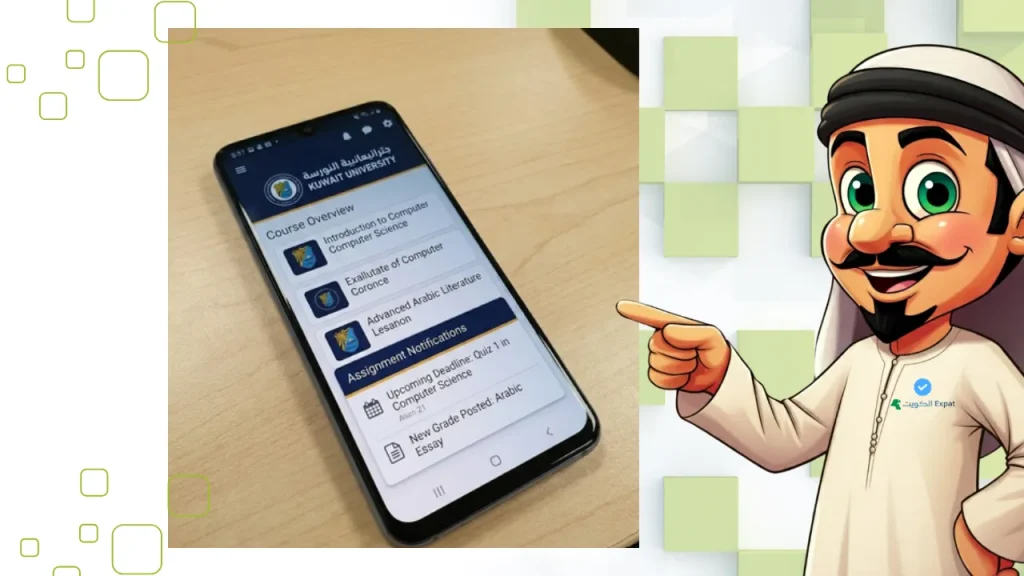
What the KU Moodle app does
The app allows students to download course activities and access them offline, receive notifications about course activity due dates and site announcements, access quiz, assignment, and course content, and participate in discussions and send messages to course participants.
The offline access feature is particularly valuable during Kuwait University exam periods when on-campus Wi-Fi can be congested. Downloading course materials to the app before entering an exam session area ensures you can review notes without relying on connectivity.
Attempting quizzes on the app
The KU Moodle app supports attempting quizzes and exams within the application. However, some faculty members restrict quiz access to the desktop browser version for proctoring purposes. Always confirm with your instructor whether a quiz is app-compatible before attempting it on mobile.
Moodle KU for Faculty Members
Faculty members at Kuwait University use Moodle as the primary course management interface. Faculty can create and manage classrooms, record assessment results, and provide reports to the administration.
What faculty can do in Moodle KU
Course creation and content upload allows faculty to build the full course structure, upload all semester materials, and set the visibility of each item by date. Assignment management lets instructors set submission deadlines, accept file uploads from students, and grade submissions directly within Moodle. Quiz construction gives faculty the ability to build question banks, set time limits, randomise question order, and release results to students on a schedule. Forum management enables faculty to post announcements and monitor discussions, replacing the need to mass-email the class. Grade reporting generates end-of-semester grade summaries that can be used to produce reports and studies at the end of the semester or academic year.
The Electronic Learning Center (ELC) at elc.ku.edu.kw publishes a separate Faculty Moodle Guide with detailed instructions for course setup, quiz configuration, and grading workflows.
Common Moodle KU Login Problems and How to Fix Them
| Problem | Most Likely Cause | Fix |
|---|---|---|
| “Invalid credentials” on KU SIS login | Wrong email format or expired KU SIS password | Reset password via KU IT services, not Moodle |
| Page not loading | Planned maintenance or browser cache issue | Clear browser cache; try incognito mode; try a different browser |
| Not seeing enrolled courses after login | Courses not yet published by faculty | Wait until the start of the teaching week; check with your college |
| Quiz not accessible on mobile app | Faculty restricted quiz to desktop only | Switch to desktop or laptop browser |
| “Lost password” email not received | Email in spam folder, or wrong email on file | Check spam; contact ELC if email does not arrive within 10 minutes |
| KU SIS redirects to error page | KU central authentication system maintenance | Try again after 30 minutes; check ku.edu.kw for service announcements |
Common Moodle KU login errors and solutions, 2026. For unresolved issues, contact the Kuwait University Electronic Learning Center (ELC) via elc.ku.edu.kw.
Pro Tip: Set up the Moodle Calendar sync with your phone’s native calendar app at the start of each semester. Inside your KU Moodle dashboard, the Calendar section provides an export link in iCal format — compatible with Google Calendar, Apple Calendar, and Outlook. Importing this at the beginning of term means every assignment deadline and quiz date appears on your phone automatically, with phone notifications, without manually checking Moodle daily. Students who do this typically miss fewer deadlines than those who rely on checking the dashboard reactively.
Final Thoughts
Moodle KU login is not complicated — but most problems that students experience are caused by using the wrong login method, landing on an unofficial page, or not having the KU Moodle app installed. The official URL (moodle.ku.edu.kw) and the KU SIS login route cover the vast majority of Kuwait University students. Faculty and specialist users needing the Local User route will have been given those credentials through their college or department.
Beyond the login itself, the platform’s real value is in what it enables: offline course access, deadline tracking through the Timeline, electronic submission with timestamps, and direct messaging to instructors — all tools that, when used consistently, improve academic organisation across the semester.
Frequently Asked Questions
What is the Moodle KU login link for Kuwait University?
The official Moodle KU login URL is moodle.ku.edu.kw. Bookmark this address directly — avoid searching for it each time, as unofficial pages with similar names appear in search results and may cause confusion. The login page offers three entry options: KU SIS (recommended for all enrolled students and faculty), Local User Login, and guest access.
What is the difference between KU SIS login and Local User login on Moodle?
KU SIS login uses your Kuwait University institutional email and password — the same credentials linked to your Student Information System account. This is the standard method for all enrolled students. Local User login uses a separate Moodle-specific username, assigned to certain staff, external users, or as a fallback. If you have a university email, always use KU SIS login first.
Can I use Moodle KU on my phone?
Yes. Kuwait University publishes a dedicated app called KU Moodle on both the Google Play Store and Apple App Store, developed by Human Logic. It allows you to access course materials offline, receive assignment deadline notifications, participate in forums, and attempt quizzes. Download the KU-specific app — not the generic Moodle app — to ensure full compatibility with Kuwait University’s system configuration.
What do I do if I cannot log in to Moodle KU?
First, confirm you are using the correct login method (KU SIS vs Local User). If your KU SIS credentials are failing, the password reset must go through Kuwait University’s IT systems — not the Moodle lost password page. If you use Local User login, click “Lost password?” on the login screen and follow the email recovery steps. For persistent issues, contact the KU Electronic Learning Center (ELC) at elc.ku.edu.kw.
Does Kuwait University Moodle work for all colleges?
Yes. Moodle KU is the university-wide e-learning platform used across all Kuwait University colleges, including the College of Business Administration, College of Engineering and Petroleum, College of Medicine, College of Arts, and others. Individual faculty members control whether and how they use Moodle within their courses, so course content depth varies, but the platform itself is available to all enrolled students and faculty.
Last updated: 01/05/2026
Reviewed by: Kuwait University digital services content team — cross-referenced against the Kuwait University Electronics.
Read More: “Indemnity Calculator Kuwait” – “Kuwait Towers” – “Kuwait Emergency Number (112)“

