
The Philippines e travel pass is a free, mandatory online registration every traveller must complete before arriving at or departing from any Philippine airport. It replaced the old paper arrival card and One Health Pass. All OFWs, balikbayans, foreign nationals, and Filipino tourists — including those based in Kuwait — must register at etravel.gov.ph within 72 hours before their flight.
Before Your Kuwait–Philippines Flight
- Register at etravel.gov.ph only — it is 100% free. Any website charging a fee (commonly PHP 500–PHP 1,500 or equivalent in KD) is a scam. Report it to the CICC.
- Set a reminder for 72 hours before departure — the system does not accept registrations made earlier than the 72-hour window, so registering too early is the most common error OFWs make.
- OFWs need both eTravel AND the OFW Pass — completing eTravel alone is not sufficient for departing overseas workers; both documents are checked at Philippine immigration.
What Is the Philippines eTravel Pass?
The Philippines eTravel Pass is a digital single data collection platform launched in December 2022 by the Bureau of Immigration to replace the paper eArrival card. Before its introduction, travellers filled in a physical form on the plane before landing — a slow, error-prone system that immigration officers had to manually process for thousands of passengers daily.
What the eTravel pass replaced
The eTravel system replaced two earlier systems: the paper Arrival Card and the One Health Pass (OHP) website used during the pandemic period. eTravel replaced the previous One Health Pass in 2022 and continues to be the official platform for arrivals in the Philippines. It is now the single mandatory digital declaration for both arrivals and departures.
What it collects and why it matters
The eTravel system is an integrated online platform developed by the Philippine government to manage and gather information from all individuals entering or leaving the country. This system aims to build a centralised database to support border security, public health monitoring, and economic planning in the Philippines.
eTravel versus the OFW Pass — a critical distinction
Many OFWs in Kuwait confuse these two systems. The OFW pass is a digital exit clearance issued by the Department of Migrant Workers (DMW) and serves as an identification for returning workers, also known as “Balik Manggagawa.” eTravel is a separate and mandatory online travel and health declaration system required by the Philippine government for border control — it applies to everyone travelling internationally to or from the Philippines.
Many OFWs mistakenly assume that completing eTravel is enough to leave the Philippines. However, immigration officers will still look for proof of overseas employment clearance, which is where the OFW pass comes in. Both are free. Both are required. Neither replaces the other.
Who Needs the Philippines eTravel Pass?
Almost all international travellers and Filipino citizens arriving in and departing from the Philippines must register for eTravel. People entering the Philippines through an international port — whether by air or sea — or departing must complete eTravel registration.
This includes the following groups relevant to the Kuwait Filipino community:
| Traveller Type | Registration Required | Notes |
|---|---|---|
| OFW returning to Philippines | Yes (Arrival form) | Also need OFW Pass for departure from Kuwait |
| OFW departing Philippines to Kuwait | Yes (Departure form) | OFW Pass also mandatory |
| Balikbayan | Yes (Arrival form) | Balikbayan box customs declaration now integrated |
| Filipino tourist | Yes (Arrival/Departure) | Standard registration |
| Foreign national visiting Philippines | Yes (Arrival form) | All nationalities required |
| Child under 15 | Yes, via parent’s account | Parent adds child as accompanying person |
| Diplomat / official aircraft crew | Exempt | Processed through separate channels |
eTravel pass requirements by traveller category, 2026. Source: Bureau of Immigration, Philippines.
The requirement applies regardless of which airport you land at — NAIA (Ninoy Aquino International Airport), Mactan-Cebu International Airport, Clark International Airport, or any other international gateway.
What You Need Before You Register?
To register for the Philippines eTravel Pass, you need exactly four items: a valid passport, your flight details, an accommodation address in the Philippines, and an active email address. You do not need to upload any documents or photos; all information is entered manually in the online form.
| Requirement | Detail | Common Mistake |
|---|---|---|
| Valid passport | Passport number required at sign-up | Entering wrong passport number causes mismatch at immigration |
| Flight details | Arrival date, airline name, flight number | Using Kuwait Airways codeshare number instead of operating carrier number |
| Philippine accommodation address | Full address of first night’s stay | Leaving this blank — it is required, not optional |
| Active email address | Used for OTP verification and QR delivery | Using an email you cannot access on mobile at the airport |
The accommodation address is one of the most commonly missed eTravel requirements — it is not listed by most travel guides, yet the eTravel form requires it. You only need the address for your first night of accommodation. Look up the hotel address on Google Maps before starting registration — you cannot save and return to the form mid-way.
How to Register for the eTravel Pass?Step by Step
The eTravel system is a fully digital platform — registration is completed entirely online. Make sure you have a stable internet connection while filling out the form. A poor connection may result in data loss or duplicated entries.
Step 1 — Open the official eTravel portal Go to etravel.gov.ph on a browser (Chrome or Firefox recommended). Do not use third-party sites. The official URL is the only legitimate registration point — it has no payment screen.
Step 2 — Create your account Click Sign In, then select Create an Account. Enter your email address and click Continue. The system will send a 6-digit OTP to your email. Enter the OTP promptly — it expires quickly.
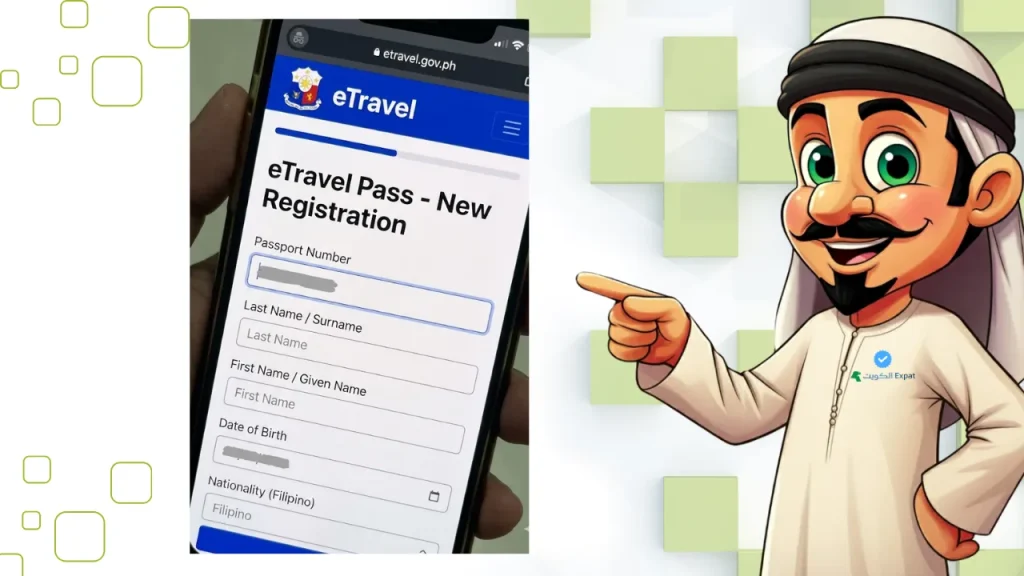
Step 3 — Set your password and enter personal details Create an 8-character password. Then enter your full name, sex, date of birth, citizenship, phone number, country of birth, and passport number. For OFWs in Kuwait, enter your Kuwait mobile number in international format (+965).
Step 4 — Start your travel registration Once logged in, select Arrival or Departure depending on your travel direction. Select your transportation method (air, for most Kuwait-based travellers).
Step 5 — Complete travel details Enter your occupation, travel purpose, and country of origin (Kuwait). Then provide your flight details — arrival or departure date, airline name (e.g., Kuwait Airways, Philippine Airlines, Cebu Pacific), and flight number.
Step 6 — Enter your Philippine address and seat number Select the destination airport and enter your Philippine accommodation address (hotel or home address). Enter your seat number if already allocated.
Step 7 — Complete the Health Declaration Form Answer the health declaration questions honestly. The form covers recent illness, exposure to communicable diseases, and general health status. COVID-19 vaccination certificates are no longer required for entry into the Philippines.
Step 8 — Add family members if applicable If you are travelling with minor children, elderly parents, or any dependent family members who cannot register on their own, this step allows you to include them under your account. A separate declaration will be automatically generated for each added family member.
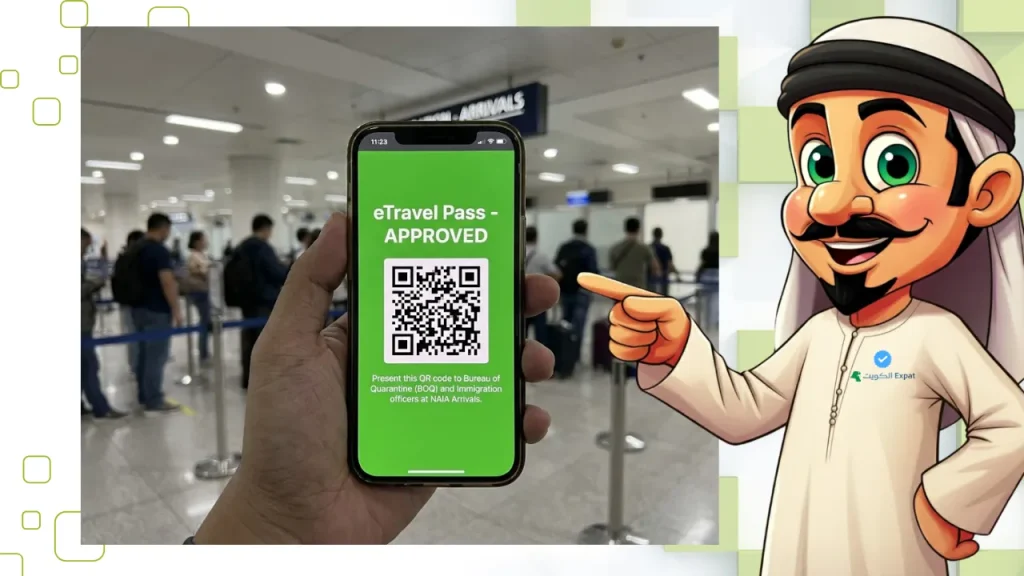
Step 9 — Submit and save your QR code Review all details, then submit. After completing your registration, you will receive a QR code. Take a screenshot or download the QR code immediately, as you will need to present it at the airport.
Understanding Your eTravel QR Code
After a successful registration, the system generates a unique QR code. A green QR code means no issues — you can proceed to immigration smoothly. A red QR code means further screening is required.
What the QR code replaces
The Customs Declaration is now part of your eTravel registration. Your QR code includes both health and customs information, so no paper form is needed. This is a significant change from earlier years — there is no separate customs card to fill in on the plane.
Retrieving a lost QR code
If you lose your QR code, you can retrieve it by visiting the eTravel website, selecting “Edit Registration,” and providing your reference number and date of birth. Alternatively, check the original confirmation email sent at registration.
Key rules to remember
Each eTravel registration is valid for a single entry or departure. If you’re travelling again, you need to register anew. If you accidentally register more than once and receive multiple QR codes, choose only one code to present during your travel. TikTok
Timing Your eTravel Registration from Kuwait
Registration on the eTravel system must be completed within 72 hours before your arrival in or departure from the Philippines. The system does not accept registrations submitted earlier than the 72-hour window — this is a hard limit in both directions.
| Scenario | Recommended Registration Time |
|---|---|
| Flying Kuwait → Manila (KWI–MNL) | 48–60 hours before departure |
| Flying Kuwait → Cebu via Manila transit | 48–60 hours before first departure |
| Departing Philippines → Kuwait | 48–60 hours before departure from Philippine airport |
| Long layover in Doha or Dubai | Register based on final arrival time in Philippines |
Recommended eTravel registration timing for Kuwait-based travellers, 2026.
A practical guide for OFWs on Kuwait Airways and Philippine Airlines routes: typical flight time from Kuwait International Airport (KWI) to NAIA Terminal 1 is 8–10 hours with a transit stop. Set your registration reminder to 60 hours before your Kuwait departure time.
Registering via the eGovPH Mobile App
If you prefer mobile registration, the eTravel system is available via the eGovPH super app, downloadable from the Google Play Store and Apple App Store. TikTok The app covers multiple Philippine government services under one login, including the eTravel pass. The registration process mirrors the website steps above.
The app is particularly useful for OFWs in Kuwait who manage their OFW Pass through the same platform — both documents can be accessed and presented from one app during airport check-in.
Pro Tip: Save your eTravel QR code as both a screenshot AND a downloaded PDF, stored in your phone’s gallery offline — not just in your email inbox. Mobile data at Kuwait International Airport’s departure gates can be unreliable during peak travel periods (Eid holidays, Filipino workers’ peak balik season in January and June), and loading your email at the gate wastes time. A screenshot opens instantly, even in airplane mode.
What Happens If You Arrive Without Registering?
If you arrive without eTravel registration, you will be required to complete registration at a kiosk in the airport arrival area. This delays your immigration clearance and may cause you to miss connecting transport, particularly at NAIA where queues during peak periods are long. Completing registration before your flight costs 5–10 minutes at home; completing it at the airport kiosk during a busy arrival can take 30–60 minutes.
Final Thoughts
The Philippines e travel pass is not a paperwork hurdle — it is a 5 to 10 minute online process that makes your arrival at Philippine immigration faster and more predictable. For OFWs travelling from Kuwait, the most important rules are three: register only at etravel.gov.ph (free, official), register within the 72-hour window (not earlier), and bring your OFW Pass separately if you are a departing overseas worker.
Getting both documents right before you leave Kuwait means you walk through NAIA immigration with a green QR code, a valid OFW Pass, and zero unnecessary delays — which is exactly how a hard-earned vacation or family visit should start.
This article is for informational purposes only and does not constitute legal or immigration advice. Philippine government requirements may change. Always verify the latest requirements at the official Bureau of Immigration website or the Philippine Overseas Labor Office (POLO) in Kuwait before travelling.
Frequently Asked Questions
Is the Philippines eTravel pass free for OFWs in Kuwait?
Yes, eTravel registration is completely free for all travellers, including OFWs based in Kuwait. The only legitimate registration site is etravel.gov.ph. Websites or agents charging PHP 500, PHP 1,500, or any equivalent amount in KD for eTravel “assistance” or “processing” are third-party services unaffiliated with the Philippine government. Report them to the Cybercrime Investigation and Coordinating Center (CICC).
Can I register for the eTravel pass more than 72 hours before my flight from Kuwait?
No. The eTravel system only accepts registrations within the 72-hour window before your scheduled arrival or departure. Attempting to register earlier will be rejected by the system. The recommended approach is to register 48–60 hours before your Kuwait departure to allow time to fix any errors without falling outside the window.
Do I need to print my eTravel QR code or is a screenshot enough?
A screenshot or digital display on your phone is sufficient — you do not need to print the QR code. However, saving the QR as both a screenshot and a PDF in your phone gallery (not just in your email) is strongly advised in case of connectivity issues at the airport. A printed backup is also useful for elderly travellers or those with older devices.
What is the difference between the OFW Pass and the eTravel pass?
The OFW Pass is a departure clearance issued by the Department of Migrant Workers (DMW), proving you are a documented overseas worker authorised to leave the Philippines for work abroad. The eTravel pass is a mandatory travel and health declaration form for all travellers, both arrivals and departures. For OFWs in Kuwait returning to work, both documents are required — they are not interchangeable.
Can I register my children or family members under my eTravel account?
Yes. Children under 15 and dependent family members travelling with you can be added under your eTravel account as accompanying persons. Each family member requires their own individual information to be entered, and a separate declaration is generated for each person under your submission. Children travelling alone must have an account created by a responsible adult.
Last updated: 18/04/2026
Reviewed by: Kuwait-based travel content team — cross-referenced against Bureau of Immigration Philippines official portal (etravel.gov.ph), Philippine Overseas Labor Office (POLO) Kuwait advisories, and Gulf News OFW reporting (February 2026).
Read More: “Kuwait Bus Route Numbers” – “Kuwait Medicine Price List” – “Indian Passport Renewal in Kuwait” – “Kuwait Emergency Number”

