

Kuwait civil id payment is straightforward: confirm any dues on PACI’s Civil ID e-Services, then settle via K-Net online or through the Sahel app; kiosks are a card-only fallback. Most payments post instantly, but receipts matter for pickup or delivery—save the PDF and note your reference number.
Do this next
- Open PACI → Civil ID → Fees Payment.
- Enter your Civil ID to view dues and the total.
- Pay via K-Net and download the receipt.
What you can pay (and when)
Renewal vs. replacement
Renewal payments appear once your renewal request is approved or data changes are verified. Replacement fees apply only for lost or damaged cards.
Fines and late actions
Some fines (e.g., late first-time expat registration) can be paid in the same flow. If fines don’t appear, you may need the specific fine service first.
Delivery add-on
Home delivery can be paid after your card status shows “Ready for delivery/collection.” You’ll hand over the old card upon receipt.
Visibility window
Dues may take 24–72 hours to appear after a status change. If nothing shows, recheck later or try Sahel/kiosk.
Kuwait civil id payment fees 2026
Typical published amounts
Use these as a guide; always pay the exact amount shown at checkout.
| Fee type | Amount (KWD) | Where you’ll see it | Notes |
|---|---|---|---|
| Smart card (citizens/expats) | 5.000 | PACI/Sahel | Standard issuance/renewal |
| Plastic card (domestic staff) | 2.000 | PACI/Sahel | Staff category only |
| Envelope/issuance add-on | 0.250 | PACI/Sahel | Often auto-added |
| Replacement (lost/damaged) | 20.000 | PACI/Sahel/kiosk | Fixed charge |
| Temporary certificate (optional) | 1.000 | PACI | While waiting for card |
| Home delivery | 2.000 | PACI/Sahel | Per first card |
| Additional card to same address | 0.250 | PACI/Sahel | Each extra card |
| Late first-time expat registration (example fine) | 20.000 | Fine portal/PACI | If applicable |
Payment methods
K-Net (national debit) is the primary method online. Some flows may accept bank cards routed through the national gateway. Kiosks are card-only.

How to pay online (PACI e-Services)
Step 1 — Open e-Services
Go to Civil ID → Fees Payment. Confirm you’re on the official portal before entering any data.
Step 2 — Enter Civil ID
The system fetches dues (card fee, add-ons, fines). Verify your name and the total.
Step 3 — Pay via K-Net
Choose your bank, approve the OTP, and wait for the confirmation screen before closing.
Step 4 — Save the receipt
Download/print the receipt. You’ll need it if you selected delivery or for pickup.
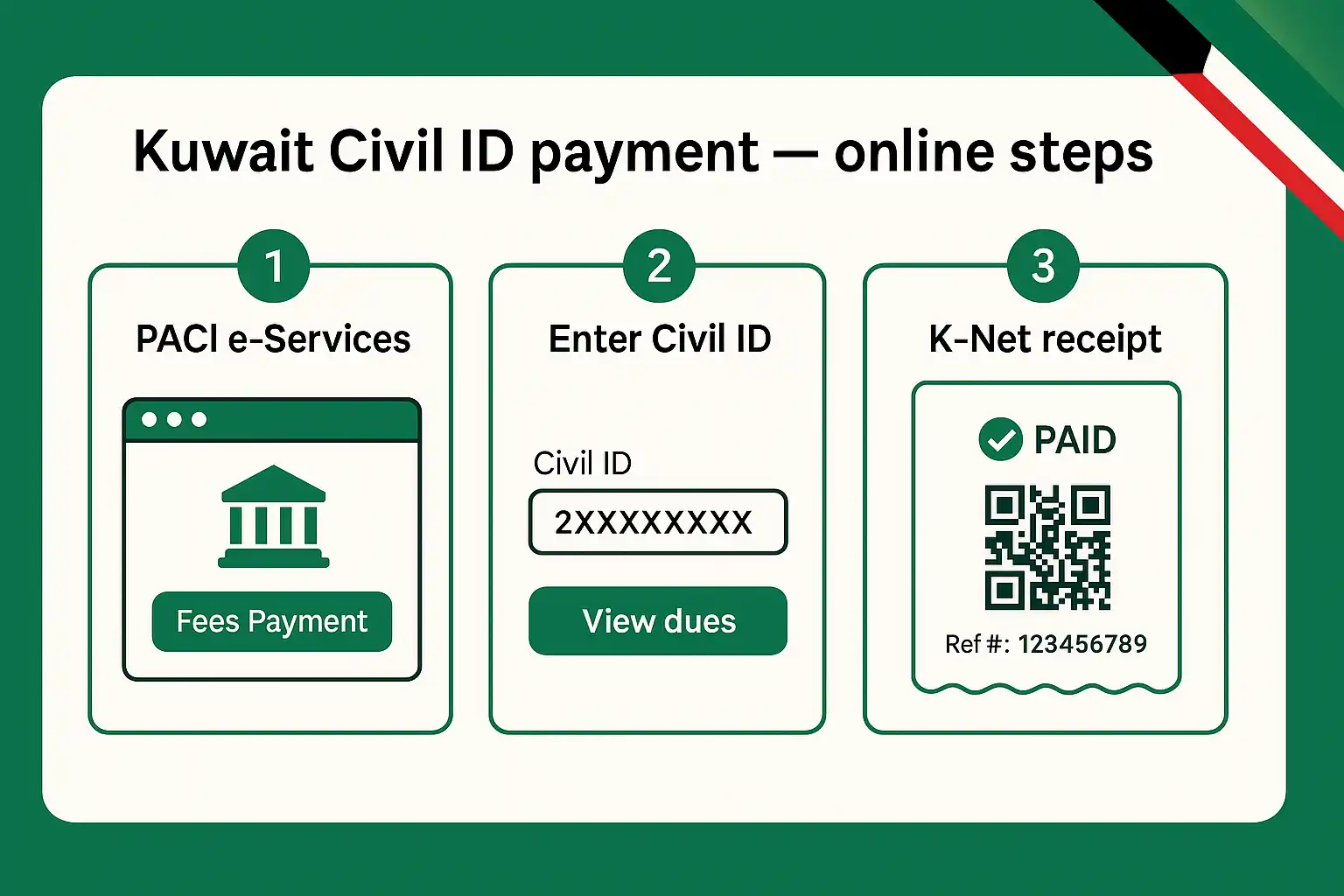
This is the fastest route for paci civil id renewal payment once your request is approved.
Paying through the Sahel app (alternative)
Where to find it
Inside Sahel, open government services → PACI → Civil ID services → Fees/Payment.
What you’ll see
The app mirrors portal dues. If nothing shows, the backend hasn’t posted your charges yet.
Completing payment
Proceed through the K-Net gateway. The app provides an e-receipt; keep a copy.
When to use Sahel
Use Sahel if the portal is busy, you’re on mobile, or you prefer app-based receipts.
PACI self-service kiosks (fallback)
Availability and access
Kiosks are placed at PACI and select government locations. Hours vary by site.
What you can do
Check dues, pay by card, and print a kiosk receipt. Some kiosks support card printing steps.
When kiosks help most
If your bank’s 3-D Secure is failing online, or if the portal/app shows maintenance, kiosks are reliable.
Step-by-step: pay and get your receipt
- Open PACI e-Services (Civil ID → Fees Payment) or Sahel.
- Enter Civil ID → verify name and total.
- Pay via K-Net → wait for the confirmation page.
- Download/save the receipt → note the reference.
- If delivery is selected, keep phone on for SMS.

Compare your payment paths
| Path | Best for | Receipt access | Typical hiccups |
|---|---|---|---|
| PACI web | Desktop users, fastest posting | PDF on confirmation page | OTP timeouts, nightly maintenance |
| Sahel app | Mobile-first users | In-app receipt/history | App sign-in or cache issues |
| Kiosk | Card-only, web/app issues | Printed receipt | Limited hours, queues at peak times |
Common issues and fixes
“No dues found”
Your renewal/replacement may not have posted yet. Check again after 24–72 hours, confirm your Civil ID, and try Sahel or a kiosk.
K-Net declined or 3-D Secure failed
Enable online payments, try another card/bank, switch networks, or pay at a kiosk.
Name or amount mismatch
Re-enter the Civil ID and re-load the page. If still wrong, contact support before paying.
Receipt not downloaded
Return to “Payment History” (portal/app) the same day to re-download. Screenshots are a backup, not proof.
Edge cases and timelines
Replacement after loss/damage
Pay the 20 KWD fee, then follow the replacement workflow. Bring ID for pickup.
Delivery timing
Delivery contact usually occurs within a few working days after status flips to “Ready.” Keep the old card ready to hand over.
Data change renewals
If you changed photo/address, fees appear after verification. Processing can delay the payment window.
Pro Tip: If the K-Net OTP SMS lags, wait on the payment page—don’t refresh. A duplicate click can trigger a second pending attempt that banks briefly hold.
FAQs
How do I know if I still owe Civil ID fees?
Open the official payment screen and enter your Civil ID. If dues exist, you’ll see the itemized total and a Pay button. If nothing appears, your case may still be processing; check again in 24–72 hours or use Sahel/kiosk.
Can I pay for a family member’s card?
Yes, if you have their Civil ID number and consent. The receipt will list that person’s details. Keep a copy for any delivery or pickup.
Are cash payments allowed?
Online payments are via K-Net; kiosks are card-only. For special cases at service counters, follow on-site instructions, but expect card use to be required.
How long until the payment reflects?
Usually immediately. If the status doesn’t update, wait a short while and refresh the portal/app. Delivery or pickup scheduling is separate and may take a few working days.
Related Articles
- Kuwait Civil ID Format
- Kuwait Civil ID Renewal Online
- Meta Kuwait Portal
- Kuwait Iqama Check Online
- Kuwait Civil ID Fine Check
- Civil ID Name Check
- Ahmedi Fingerprint Office Kuwait
- South Subahiya Civil ID Collection Center
- PACI Headquarters South Surrah
- Kuwait Civil ID Validity Check
- Kuwait Civil ID Status Check

